See when the brochure you sent was opened
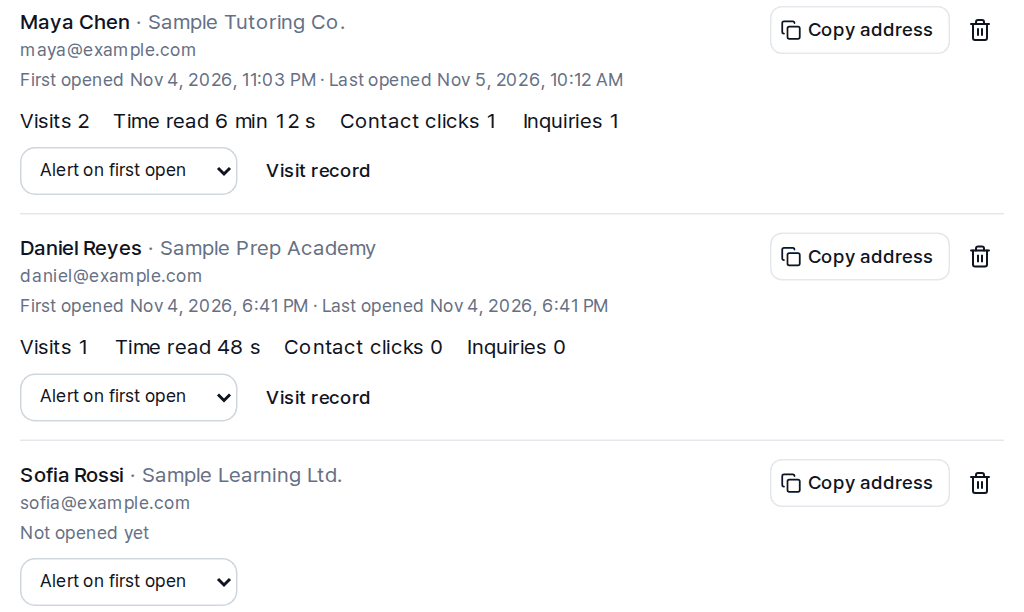
LabChure lets you send a brochure link and see when it was opened. Your brochure is a web page at its own address, and you create a separate link for each person you send it to. For each link, you see when it was first and last opened, how many visits it had, and how long it was read.
How it works
- 1
Make the brochure
Upload the files you already have, such as PDF, PowerPoint, Word, Excel, HWP, or images, or add a web page link. AI writes the text from your files, and you check it and publish.
- 2
Create a link for each person
Enter a label, such as a name. Company and email are optional and only help you tell links apart. LabChure does not email the recipient. You send the link yourself, the way you normally would.
- 3
See what happened
Each link shows first and last open, visits, time read, contact clicks, and inquiries. The visit record adds scroll depth and the sections read longest. LabChure emails you the first time a link opens.
What counts as an open
- A visit counts as opened only after the page has been visible for more than 5 seconds. No cookies are used.
- A link shows that it was opened, not who is reading. If someone forwards it, those visits count on the same link.
- If you open a link yourself for more than 5 seconds, that visit is recorded. Use Preview to check the page before sending.
Plans
Recipient links: 2 on the free plan, 50 or more from Starter. Making a brochure is free to start, and every plan shows daily visits.
Questions
Does the recipient get an email from LabChure?
No. You send the link yourself.
Does the recipient need an account or an app?
No. The brochure opens as a web page.
Do I need to install a tracking script?
No. There is nothing to set up.
Can I add an email gate or a password?
Not today. A brochure opens for anyone who has the link.